Grades, thresholds and grading text
EduBase scores a test as soon as it is submitted, except for answers scored by hand. A grading turns the percentage into a grade, or into passed and failed. Without a grading, participants see points and a percentage only. Certificates and retries until passing need a grading that decides what counts as a pass.
Choose a grading
In the exam's Basic data and settings, under Scoring, grading, choose the Grading method:
- Not set: no grade.
- None, but exam can be repeated freely: no grade, and participants can take the test again.
- A preset, such as Passed/Failed (custom threshold): enter the Threshold (%) needed to pass. Other presets give pass and fail at a fixed percentage, or grade scales with several thresholds.
- Custom presets: your own scales, and those shared in your organization.
Scope decides where the grading is saved: Set only for this exam, or Set globally for this Quiz set, in the Quiz set's own settings.
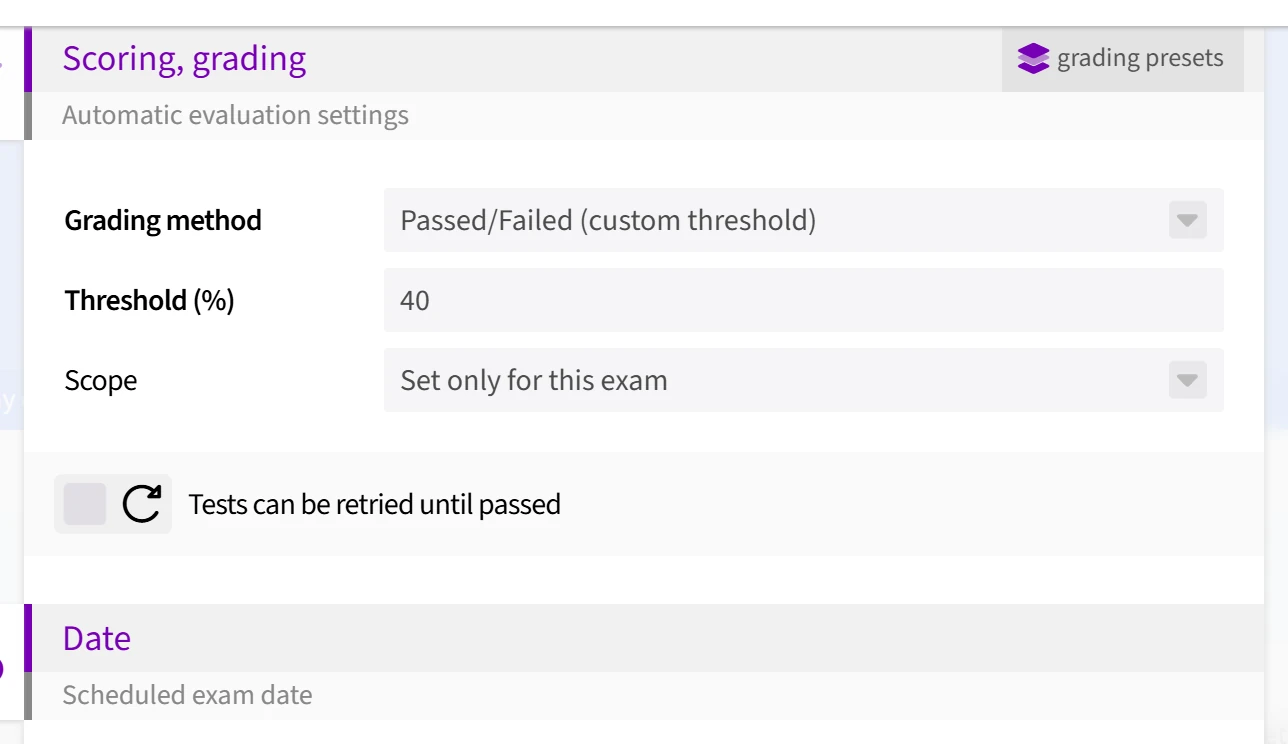
The exam → Basic data and settings → Scoring, grading
With a pass and fail grading, Tests can be retried until passed lets participants try again after a fail. More attempt settings, such as the number of attempts and the waiting time between them, are under Advanced options. See Attempts, retakes and linked exams.
Make your own scale
grading presets next to the section title opens your presets. A custom preset has:
- A Name, Language and Type: Passed/Failed, school or university grades, or Custom with grades you name yourself.
- Every grade is considered a success, when the grades are labels and none of them is a fail.
- Thresholds and grades: for each grade, the percentage from which it applies, and an optional Text shown under the grade.
You can share presets with your organization, and clone one to start a new scale from it.
Personalize the text under the grade
The Text of a grade can contain variables that EduBase fills in when the participant sees the result:
- the exam's name, code, external identifier and link;
- the grade and the attempt number;
- the points, the maximum and the percentage;
- the participant's name, username and email address;
- a value the participant entered before the test, such as
{field:EmployeeNumber}.
Formatting: *...* for bold, and three or more spaces for a line break. A variable never shows something the exam itself hides from the participant.