Import from Excel
An Excel sheet is the quickest way to put many similar questions into EduBase: one question per row, one setting per column. You upload the .xlsx file into a Quiz set or into My Quiz questions, and EduBase creates up to 500 questions at once. To bring images and attachments along, pack the sheet and the files into a ZIP. For an overview of all formats, see Import questions in bulk.
Start from the sample
- Open the upload window: in a Quiz set, Tasks → add questions → Upload as file; outside a Quiz set, My Quiz questions → new question → Upload as file.
- Choose sample Excel at the top of the window. documentation downloads the description of every column.
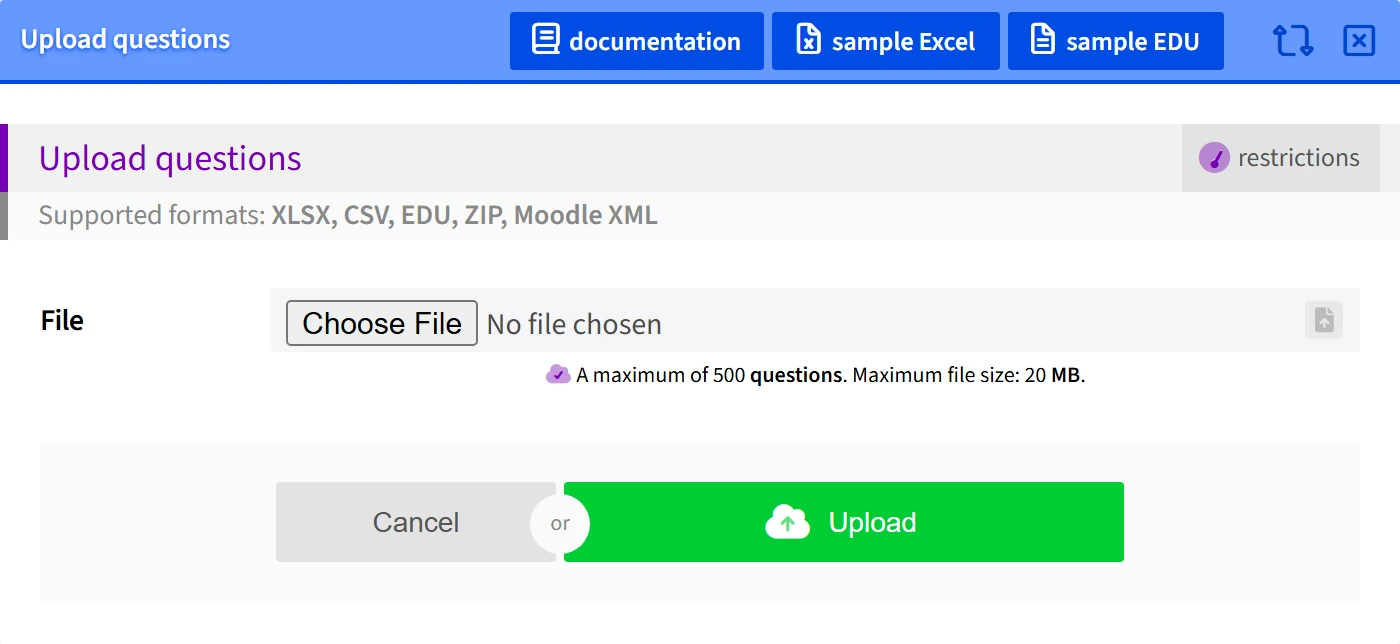
Tasks → add questions → Upload as file
The sample's Questions sheet has a column per question setting, grouped as mandatory (QUESTION, ANSWER, TYPE), recommended (SUBJECT, CATEGORY) and optional. The Possible values sheet lists the values that some columns accept, such as the types and the languages.
Fill in the sheet
Each row is one question. The columns have the same names as the fields of the EDU format and the API:
| Column | What goes in it | Example |
|---|---|---|
| QUESTION | The question text. Parameters in curly brackets. | Which measure is the middle value of an ordered dataset? |
| ANSWER | The correct answer, or several separated by &&&. |
Median |
| TYPE | The question type: CHOICE, MULTIPLE-CHOICE, TRUE/FALSE, NUMERICAL, EXPRESSION, TEXT, ORDER, GROUPING, PAIRING, MATRIX, SET, DATE/TIME, FREE-TEXT, FILE, HOTSPOT, READING and others; see Possible values. |
CHOICE |
| OPTIONS | The wrong options of a choice question, separated by &&&. |
Mean &&& Mode |
| POINTS | The question's points. | 1 |
| EXTERNAL_ID | Your own identifier, so a later upload updates the question. | stat1-median |
The other columns cover everything the question editor can set: parameters, hints, solutions, scoring, tags, difficulty, images and attachments. See Question types at a glance and Parameter types and constraints.
Rules the upload follows:
- Only the first worksheet is read, and its first row must hold the column names. Column names are not case-sensitive, and English and Hungarian names both work.
- An empty LANGUAGE, TYPE, SUBJECT, CATEGORY, MAIN_CATEGORY or DIFFICULTY cell takes the value of the row above, so a block of questions of one type needs the type only once. A
-clears the inherited subject or category. - Formulas are allowed; EduBase reads their result.
- In the # column,
--skips a row and---ends the sheet. Three rows in a row without a question also end it.
In a Quiz set upload, rows with the same GROUP value are put in a question group of that name. A group created this way is a merged complex task; change its type in Manage group if you want a random draw instead.
Upload and check
- In the upload window, choose the file and Upload.
- Read the message. A successful upload says, for example, "Successfully uploaded 2 questions into the database." Rows with errors are listed under Faulty questions.
- Open a few questions and use try to check them.
To correct questions, fix the sheet and upload it again. Rows with an EXTERNAL_ID that already exists in the same folder or Quiz set update that question ("Successfully updated 1 question in the database."), and rows that have not changed are skipped ("2 questions already existed in the database.").
The sample sheet's column is spelled EXTRENAL_ID. EduBase does not recognize that spelling: rename the column to EXTERNAL_ID, or a changed row is added as a new question without an identifier instead of updating the old one.
Add images and attachments with a ZIP
Put the .xlsx file and the images and attachments into one ZIP file and upload the ZIP. In the sheet, name the files in the IMAGE, ATTACHMENT or SOLUTION_IMAGE columns; EduBase matches them by file name. Attachments can carry parameters; see Parameterized Excel, Word and CSV attachments.
Limits
- Up to 500 questions per upload. The maximum file size depends on your account and is shown in the upload window; 20 MB on the demo account.
- A ZIP may unpack to at most twice the maximum file size.
- Files in a ZIP whose names differ only in accents or special characters count as the same name.
- CSV files are listed as supported, but a semicolon-separated CSV with the same columns currently imports no questions ("We did not find any questions to import."). Use
.xlsx.